Core Running Mechanics
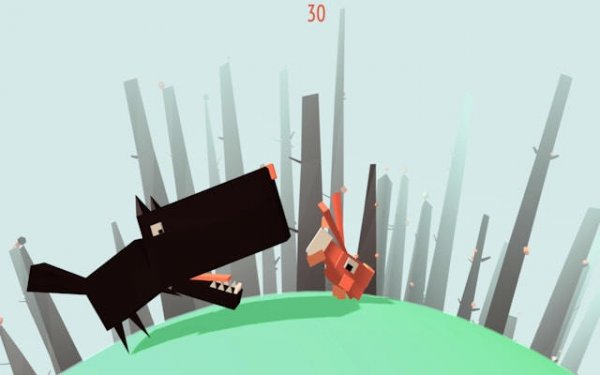
In Rabbit Chase: Carrot Runner, you control a rabbit moving left and right across a meadow path. The rabbit runs automatically, and your job is to steer. Glowing carrots are the main collectible, and each one grants a speed boost that helps you maintain distance from a dog chasing from behind. Hedgehogs hidden in the grass act as obstacles; bumping into one slows the rabbit down, giving the dog a chance to close the gap. The tension comes from balancing carrot collection with obstacle avoidance.
Controls and Input
Players use keyboard arrow keys or touch controls to move the rabbit laterally. There is no jump button or complex command list. The entire control scheme is left and right movement, which keeps the game accessible for all ages. Because the rabbit runs forward automatically, your only decisions involve when to shift lanes, when to grab a carrot, and when to dodge a hedgehog. This simplicity makes the game easy to pick up but still demanding as speed increases.
Difficulty and Progression
The dog gets faster over time, so the chase intensifies the longer you survive. Early moments feel relaxed, but as the rabbit's speed and the dog's pace both rise, reaction windows shrink. Collecting carrots becomes more than a score boost; it is a survival tool. Players who ignore carrots will lose their lead. The difficulty curve is gradual and tied directly to how far you run and how many boosts you chain together.
Visual Style and Audience
Bright visuals and a colorful meadow setting give the game a light, family-friendly tone. The rabbit, dog, and hedgehogs are presented as cartoon-like characters rather than realistic animals. There is no graphic content. The game targets players who enjoy fast-paced arcade action without a steep learning curve. Children and casual players can enjoy the simple controls, while score-chasers can focus on optimizing carrot routes and reaction times.
Compatibility
✅ This game supports:
- Desktop browsers (Chrome, Edge, Safari)
- Mobile browsers (Chrome on Android, Safari on iOS)
❌ Does NOT support: - Internet Explorer - Very old browser versions
👉 Try refreshing or updating your browser







Editorial Notes