Kids Dental Care Game
Reviews
My Dentist Doctor turns dental visits into a playful learning experience. Kids practice brushing, drilling, and filling teeth in a safe environment. The step-by-step instructions are clear, and the tasks are rewarding. It builds familiarity with dental tools and promotes good oral hygiene. The game is short enough for quick sessions but engaging enough to replay with different patients. A solid choice for parents seeking educational screen time.
Description
Game Introduction
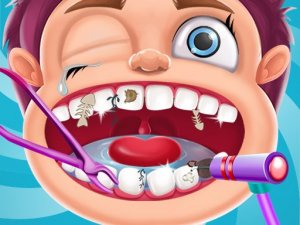
My Dentist Doctor Online Game - Kids Dental Care Game is an interactive online game designed to introduce children to the basics of dental care. Players step into the role of a friendly dentist and treat patients with common dental issues such as plaque buildup and cavities. The game uses simple, visual instructions to guide kids through each step, from brushing to filling teeth. It is educational and reassuring, helping children understand what happens at the dentist and why oral hygiene matters. The colorful graphics and gentle gameplay make it suitable for young players.
How to Play
To play, use your mouse to select dental tools like a toothbrush, drill, or filling material. Follow the on-screen instructions to clean each patient's teeth. Start by brushing away plaque, then use the drill to remove decay, and finally apply fillings to fix cavities. Polish the teeth to make them shine. Each step must be completed in order to move to the next patient. The game is easy to learn and does not require reading skills, making it accessible for all ages.
Game Features
Game features include a variety of realistic dental tools, multiple patient cases, and step-by-step guidance. The game is entirely free and runs in a web browser without downloads. It offers a safe, ad-free environment for children. The interactive elements help develop hand-eye coordination and teach responsibility.
Tips for Success
To succeed in this game, follow the on-screen instructions carefully and complete each step in order. Take your time with each tool to ensure thorough cleaning. Practice regularly to improve your speed and accuracy. Pay attention to the visual cues that indicate which tool to use next. This will help you treat patients efficiently and keep their smiles healthy.
Compatibility:
✅ Works on PC & Mobile | Recommended: Chrome / Safari / Edge
Faq
Is this game suitable for toddlers?
Can I play this game on a tablet or smartphone?
Does the game include any scary or violent content?
How many patients are there in the game?
Is there any in-game advertising or purchases?
Can multiple children play the game on the same device?
More Games

Prom Run Online Game Arcade Game

Geometry Dash Blackboard Online Arcade Game

Street Encounter Strategy Game Puzzle Game

Military Truck Transport Simulator

Super Flipside Arcade Game

Squid Fighter Online Game Arcade Game

Tank Pixel Battle Arena

Duo Vikings Online Puzzle Game

Stickman Team Return Arcade

Ninja Run Asia Arcade Action Game

SkaterGirl Online Arcade Game

Car Parking 2 Parking Game

Crazy Table Tennis Online Arcade Game

Pirate Adventure Online Game

Stellar Cathcer Online Arcade Game